
Who This Guide Is For
“AI for small business” has a noise problem. You’ve been told it changes everything. You’ve watched competitors talk about “leveraging AI.” You’ve scrolled through roundups listing 30 tools and walked away more confused than when you started.
That confusion isn’t your fault. There’s an entire industry that makes money when you feel behind.
This guide exists because most AI content is written for people with IT departments. You don’t have one. You run a business where the AI decision lands on your desk, right next to payroll and hiring and everything else. Whether you’re a contractor, a real estate agent, a property manager, a bookkeeper, an insurance agent, or a restaurant owner, the question is the same: what’s actually worth my time and money?
That’s what we cover here. You’ll get a framework for figuring out where you stand with AI right now, a filter for evaluating any tool in about five minutes, a map of what’s worth paying for, and honest guidance on what to skip entirely. Nothing here assumes you have a technical background.
If your team is bigger than 50, the core ideas still hold. The AI Readiness Levels, the 3-Hour Rule, and the Tool Filter all scale up. But the specific recommendations lean toward the operator running a smaller team, because that’s who gets overlooked.
What AI Actually Does for a Small Business
If you only read one section of this guide, make it this one.
AI for a small business comes down to four things. First, a thinking partner you can talk to. Tools like ChatGPT and Claude answer questions, draft emails, proposals, and job descriptions, and brainstorm marketing copy and client responses on demand. Second, AI features inside tools you already use. Your CRM, your calendar, your accounting software, and your email are all adding AI capabilities. Third, automation glue that connects your apps to each other. Platforms like Make, Zapier, and n8n let AI move data between tools so you don’t have to — see the National Association of Realtors technology report. Fourth, AI agents that take actions without you watching, like answering phone calls or qualifying leads.
Most businesses under 50 people should focus on the first two and ignore the rest until they’ve gotten real value from them. The Readiness Levels below help you figure out exactly where you fit and what to do next.
The 5 AI Readiness Levels
The AI Readiness Levels are a five-stage framework for diagnosing where your business stands with AI — from no usage to fully autonomous agents — so you stop buying tools meant for someone three steps ahead of you.
Get Your Free AI Tools Starter Kit
Take the 2-minute quiz to find your AI match — plus get the tools, checklist, and 50 prompts matched to your business type.
Take the Quiz →Most AI advice starts at the end. It assumes you already have a tech stack, a data strategy, and spare hours to experiment. If you don’t meet those assumptions, you feel like you’re falling behind.
You’re not. AI adoption is a sequence, not a race. To figure out where to actually spend your money, you need to know where you’re starting. These five levels aren’t a grade on your business. They’re a way to stop buying tools meant for someone three steps ahead of you.
The five levels range from no AI use at all to fully autonomous AI agents, and they’re behavioral, not based on company size. A 30-person firm can be at Level 1. A solo operator can be at Level 3. What matters is how you’re currently using technology in your daily work.
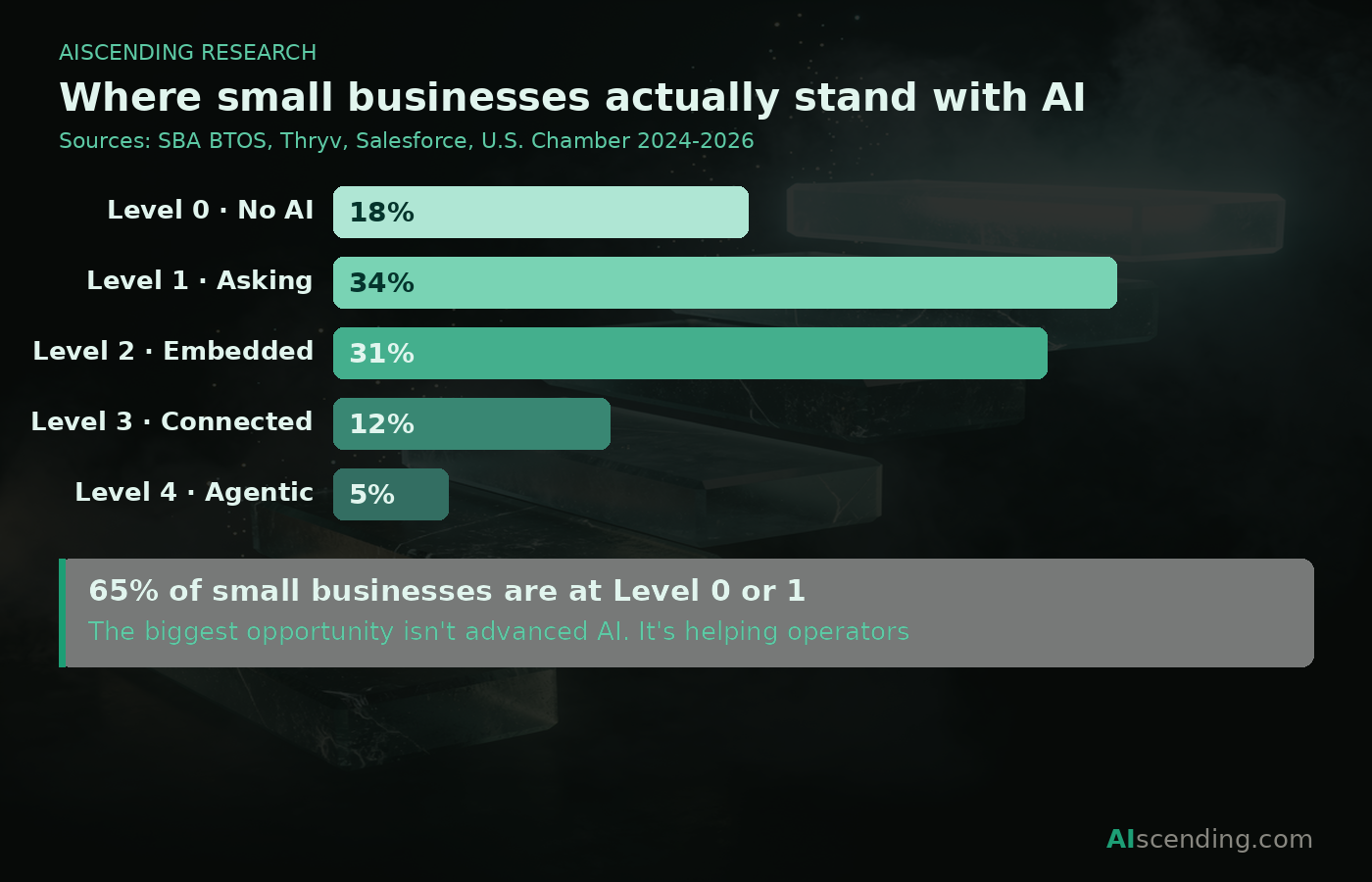
Level 0: No AI. You run your business on phone calls, paper records, manual scheduling, and voicemail. You’re not behind. You’re focused on operations. But rising labor costs and missed calls are quietly eating into your margins, and the gap between you and competitors who’ve automated even basic communication is widening. Your first move isn’t to buy anything. It’s to try a five-minute experiment from Level 1 and see what happens.
Level 1: Asking. You have ChatGPT or Claude open in a browser tab. You’re copying and pasting prompts to draft emails, summarize documents, or write job descriptions. This is the highest-return starting point for most operators right now. The free tiers of these tools save most people two to four hours a week within a month. Your next move: pick one daily task and use AI on it for a full week before you evaluate whether it’s working.
Level 2: Embedded. AI is built into tools you already pay for. Your CRM scores leads automatically. Your email suggests replies. Your accounting software categorizes expenses. You might not even think of this as “AI” because it’s invisible. Most small businesses are already here in at least one area without realizing it. Your next move: audit the tools you’re currently paying for. There is almost certainly an AI feature you’re not using yet.
Level 3: Connected. You’re using automation platforms like Make, Zapier, or n8n to move data between apps. AI summarizes support tickets and routes them. Form submissions auto-tag leads in your CRM. This is where real time savings start to compound, but it’s also where most operators get overwhelmed and quit. Your next move: identify the most repetitive task that touches two or more apps in your weekly workflow. That’s your first automation candidate.
Level 4: Agentic. AI takes actions without you watching. It answers customer calls, replies to emails, qualifies leads, posts on social media. This is where the hype lives. It’s also where most premature spending happens. The marketing makes it sound like a breakthrough, but the reality requires more setup and ongoing trust-building than vendors will tell you. Your next move: don’t start here. Even if a vendor pitches you on it. Even if a competitor brags about it. Master Levels 1 through 3 first, or you’ll spend money solving problems you don’t fully understand yet.
Most businesses under 50 people live somewhere between Level 1 and Level 2. That’s not a weakness. That’s where the time savings actually compound for a small team. Level 3 is where you go after you’ve gotten comfortable with 1 and 2. Level 4 is where you go after you’ve earned it by mastering 3. The operators who skip this sequence almost always regret the spend.
If you already know your level, jump to the Tool Filter to evaluate your next purchase, or head straight to the Tool Map to find your starting point.
The 5-Question Tool Filter
The Tool Filter is a five-minute evaluation that tells you whether an AI tool is worth your money before you enter a credit card.
AI vendors are good at landing pages. They’re good at making you feel like every month without their tool is a month you’re losing ground. Before you test anything, before you enter a credit card, run it through five questions. If you can’t answer all five, you’re not ready to buy. That’s not a problem. That’s the filter doing its job.
1. What weekly task does this replace? Not “what could it theoretically help with.” Name the specific task. If you can’t, you’re buying a solution for a problem you haven’t defined. That almost never works out.
2. Can I set it up in under an hour without help? If the answer involves a consultant, a multi-week onboarding, or a playlist of tutorial videos, the tool was built for a bigger team than yours. The best tools for small operations work out of the box.
3. Is the time saved worth more than the subscription? Honest math only. Hours saved per week times four, divided by the monthly cost. If that number doesn’t make you feel good, it’s not a deal. Most operators skip this because the landing page created a sense of urgency. Urgency is a sales tactic, not a business case.
4. What does this tool do with my data? This is where most buying guides stop asking questions. Free tiers of AI tools almost universally train on your inputs. Your client emails, your proposals, your internal notes become material that improves a model serving everyone, including your competitors. Paid tiers usually don’t train on your data, but “usually” isn’t good enough. Check the privacy policy. If it doesn’t answer this question in plain language, that tells you everything you need to know.
5. What happens when this tool gets it wrong? AI will make mistakes. The question is what those mistakes cost you. A wrong number in a drafted email is a small problem. An automated message sent to a client with bad pricing is a bigger one. A contract clause that doesn’t hold up is a catastrophe. Match the tool’s autonomy to the cost of being wrong (under FTC business guidance. The higher the stakes, the more human review you need before anything reaches a client.
If you answered all five clearly, the tool is worth a trial. If you stalled on any of them, that’s the filter working. Either the tool isn’t the right fit, or you don’t yet understand your problem well enough to choose. Walking away is free. Bad subscriptions are not.
When AI Is the Wrong Answer
Every AI guide on the internet is a long way of saying “buy more tools.” This one isn’t. There are four situations where AI is the wrong call: high-stakes one-off decisions, anything requiring client trust you haven’t earned, problems you haven’t clearly defined, and regulated work where close enough isn’t acceptable. No one in the AI industry will tell you this because they make money when you subscribe.
High-stakes decisions you make once. Hiring a key employee. Choosing a business partner. Signing a long-term lease. These decisions carry consequences that last for years, and they depend on judgment, context, and gut instinct that AI doesn’t have. Use AI to gather background information if you want, but never let it make the call. The cost of being wrong is too high and too personal.
Anything that requires trust your clients haven’t given. If a client hired you because of your expertise and your reputation, inserting AI into that relationship without their knowledge is a risk. A contractor who uses AI to draft a change order is fine. A contractor whose AI sends that change order to the client without review is one bad number away from losing the account. The line is human review before anything client-facing.
Problems you haven’t clearly defined. This is the most common one. An operator feels like something in their business is inefficient, so they buy an AI tool hoping it will clarify the problem. It won’t. AI is good at executing tasks. It’s bad at figuring out which tasks matter. If you can’t describe the problem in one sentence, you’re not ready for a tool. You’re ready for a notebook and an honest look at where your time actually goes.
Regulated work where “close enough” isn’t acceptable. Tax filings, legal contracts, medical documentation, insurance compliance. AI can draft these, but drafting isn’t the hard part. Accuracy is. And AI doesn’t know what it doesn’t know. If the output requires a licensed professional to verify it anyway, the tool didn’t save you a step. It added one.
If any of these sound like what you were about to buy a tool for, save yourself the subscription. The best AI decision you can make is sometimes the one where you don’t buy anything at all.
Which Tools Should I Start With?
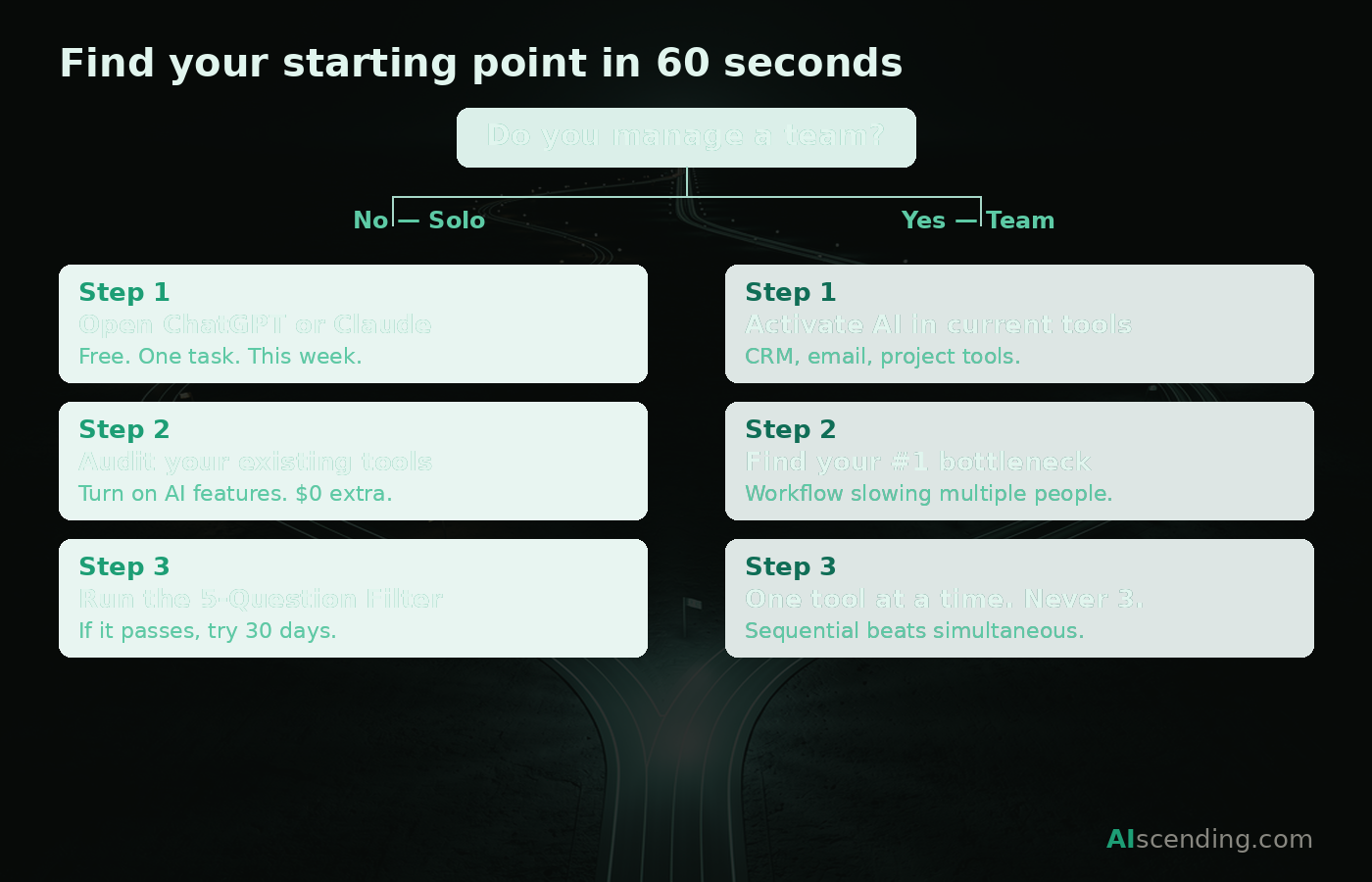
The answer depends on two things: whether you’re working alone or managing a team, and which Readiness Level you identified with in the section above. Here’s the shortest path to your first useful tool.
If you’re a solo operator:
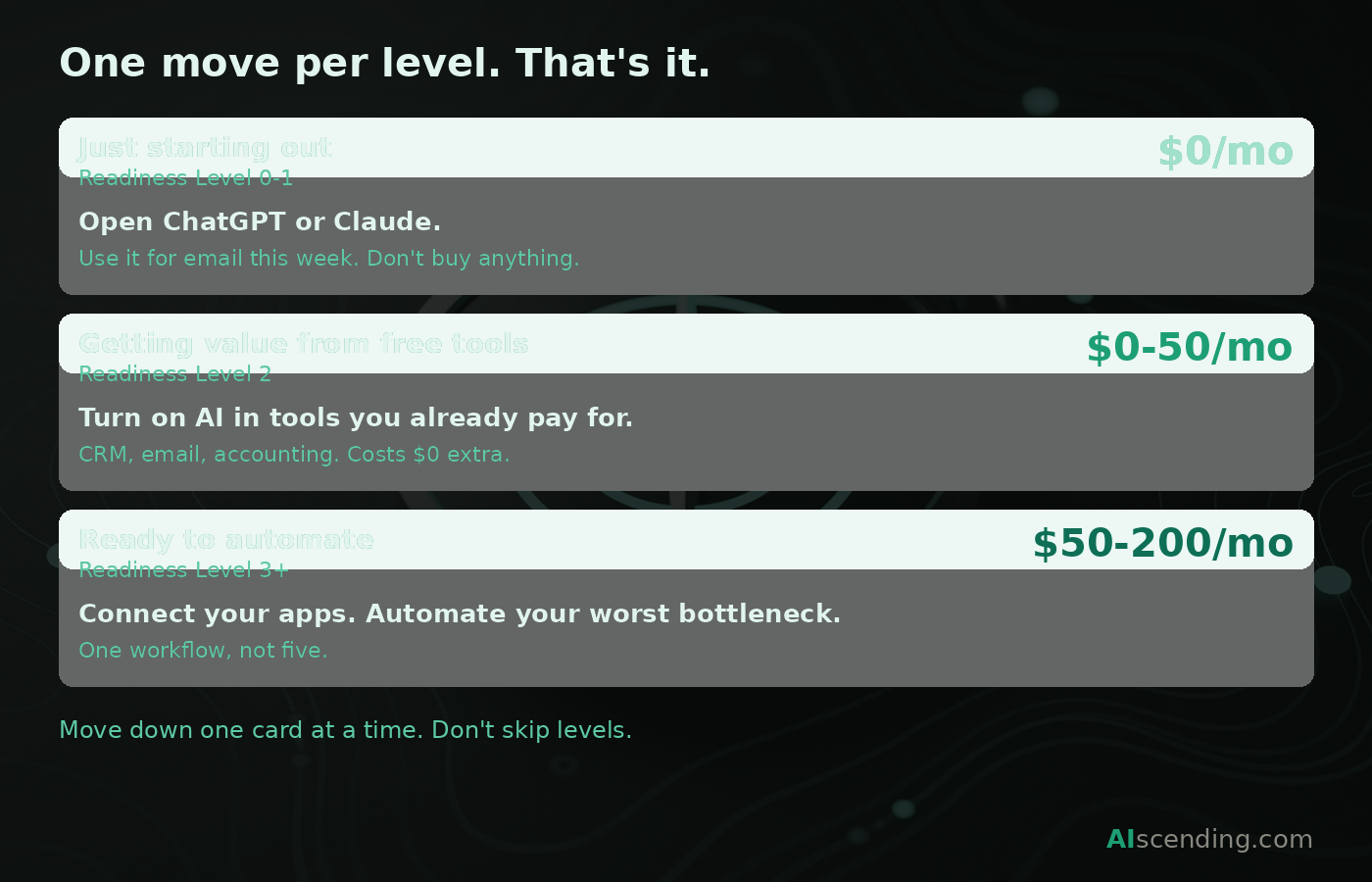
Start with Level 1. Open a free account with ChatGPT or Claude and use it for one task this week. Email drafting is the easiest starting point. Don’t buy anything yet. Just see if the habit sticks.
If it does, look at what you’re already paying for. Most CRMs, email platforms, and accounting tools have added AI features in the last year. Turn them on. That’s Level 2 and it costs you nothing extra.
Once you’re comfortable with both, then consider whether a paid AI tool solves a specific weekly problem that your existing stack can’t. Run it through the Tool Filter. If it passes all five questions, try it for thirty days and measure it against the 3-Hour Rule.
If you manage a team:
Start with the tools your team already uses. The biggest return for a team isn’t a new product. It’s activating AI features inside the software you’re already paying for across every seat. Most teams are sitting on unused AI capabilities in their CRM, their project management tool, and their communication platform.
After that, identify the one workflow that creates the most bottlenecks across the team. Not the most annoying task for one person. The one that slows down multiple people every week. That’s your first automation candidate, and it usually lives at Level 3.
Don’t roll out more than one new tool at a time. Every new tool requires someone to own it, troubleshoot it, and answer questions from the rest of the team. If you add three tools in the same month, none of them get adopted properly. Sequential beats simultaneous.
The visual above walks you through this in a step-by-step flow. If you’d rather skip the reading and follow the arrows, start there.
The 3-Hour Rule
The 3-Hour Rule: if an AI tool doesn’t save you three hours per week within thirty days, cancel it.
Every AI tool you pay for needs to pass one test: does it save you three hours a week within thirty days of signing up?
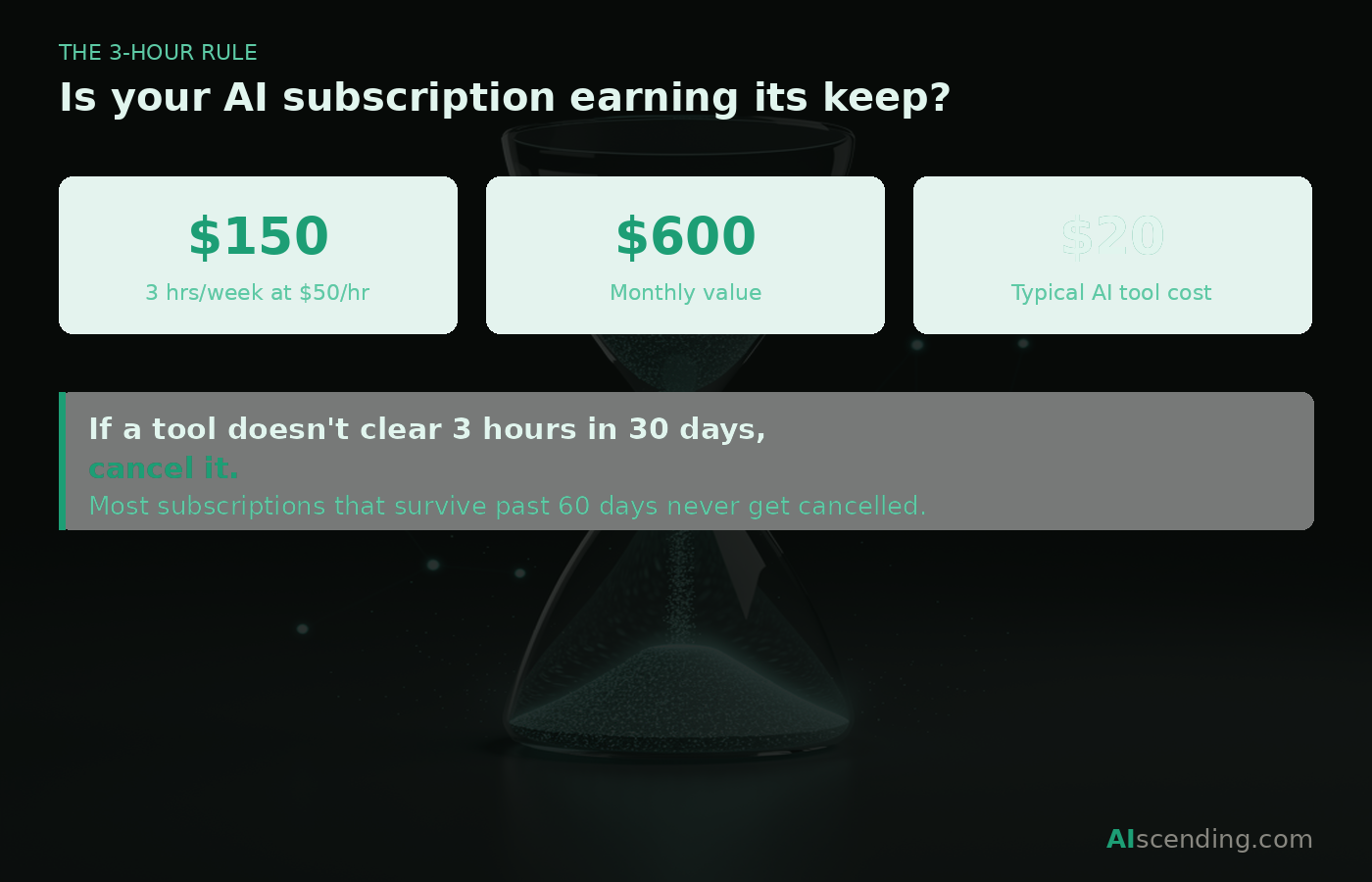
Not three hours in theory. Not three hours if you “fully implement” it. Three hours of actual time back in your week, measured against what you were doing before. If a tool can’t clear that bar in the first month, cancel it.
The math is simple. Three hours a week is twelve hours a month. For most operators, those twelve hours are worth far more than any SaaS subscription. If the tool delivers that, it pays for itself and then some. If it doesn’t, it’s just another line item on a bank statement you stopped checking.
For team deployments, scale the rule by headcount. A tool used by five people should save fifteen hours a week across the team. The per-person threshold doesn’t change. If an individual team member isn’t getting three hours back, the tool isn’t working for them regardless of what the group average says.
Why thirty days? Because that’s long enough to get past the learning curve and short enough to catch a bad purchase before it becomes a habit. Most subscriptions that survive past sixty days never get cancelled. They just quietly drain budget while the team works around them. Thirty days forces the question while you still remember what life looked like before the tool.
If you’re looking at your current stack and realizing some of your tools wouldn’t pass this test, that’s not a failure. That’s useful information. Cancel the ones that don’t clear the bar and redirect that budget toward the ones that do. Every dollar you stop spending on a tool that saves you twenty minutes a week is a dollar you can put toward one that saves you four hours.
The AI Tool Map
This is the reference section. Find your function on the left, find your Readiness Level across the top, and you’ll see where to start. Each cell lists one to three tools. If you want the full breakdown on any of them, the linked guide goes deeper.
Three tiers across the top, collapsed from the five Readiness Levels for simplicity. Foundations covers Levels 0 and 1. Embedded is Level 2. Advanced covers Levels 3 and 4.
How the tiers work:
Foundations means free or near-free, single user, no setup beyond creating an account. The only cost is your time. Embedded means the AI lives inside tools you already pay for, typically $10 to $50 per month per user. This is where most under-50 businesses should be spending. Advanced means automation platforms, multi-tool orchestration, or autonomous agents, usually $50 to $500 or more per month. Don’t go here until you’ve gotten real results from Embedded.
Writing and communication. Start free with ChatGPT or Claude. If you’re using AI to write daily, look at what’s already built into your email or document editor before buying a dedicated tool. Most operators don’t need a paid writing tool until they’ve outgrown the free tier. Full guide: AI Assistants for Business.
Customer-facing tools. There’s no free tier worth recommending here. If customers interact with your AI, you need the reliability of a paid tool from day one. Start with chat or phone depending on where your customers reach you. Full guide: AI Answering Services.
Scheduling. For solo operators, a free calendar tool handles the basics. Move to an embedded AI scheduler when calendar management eats more than two hours a week. Full guide: AI Scheduling Tools.
Sales and CRM. A spreadsheet plus ChatGPT works if you’re handling fewer than ten leads a month. Beyond that, you need a real CRM with AI features built in. Full guide: Best CRM for Small Business.
Operations and back office. Audit before you buy. Your accounting software, your project management tool, and your document editor almost certainly have AI features you haven’t turned on yet. Start there. Full guide: AI for Productivity.
For teams over 50, the same tools generally exist in enterprise tiers with added admin controls and SSO. The logic is the same. The pricing tier is different.
How to Verify What AI Tells You
AI is wrong sometimes. Confidently. It will fabricate a statistic, invent a source, or misquote an article in the exact same tone it uses for things it actually knows. There’s no warning label. There’s no change in confidence. The wrong answer looks identical to the right one.
The technical term is “hallucination,” but the practical term is “liability.” For a small business, an AI-generated email with a wrong price, a fabricated policy detail, or a made-up competitor claim can cost you a client or worse. Here’s how to catch it before it reaches anyone.
Never use AI output as a final draft. Treat everything AI generates as a first draft that needs a human pass. This applies to emails, proposals, social media posts, and especially anything with numbers or dates. Read it before you send it. Every time.
Verify any claim that matters. If AI gives you a statistic, a legal requirement, or a product specification, check it against the original source. AI doesn’t know where its information came from and it can’t tell you whether it’s current. If you can’t find the source in thirty seconds, drop the claim. A missing fact is better than a wrong one.
Be especially careful with names, numbers, and dates. These are where AI breaks down most often. It will confidently attribute a quote to the wrong person, calculate a percentage incorrectly, or reference a regulation that doesn’t exist. The more specific the claim, the more likely it needs checking.
Build a ten-second review habit. Before you send, post, or publish anything AI helped create, scan it for three things: are the numbers right, are the names right, and would I be comfortable if a client asked me where this information came from? If the answer to any of those is no, fix it or cut it.
This isn’t a reason to avoid AI. It’s a reason to use it the way you’d use a new employee who’s fast but occasionally sloppy. You check their work until you trust the output, and even then you spot-check. The operators who get burned by AI are almost always the ones who stopped reviewing.
Privacy and Your Data
Most AI privacy advice for small businesses falls into two categories: too vague to act on (“be careful what you share”) or too technical to apply (“ensure SOC 2 Type II attestation”). Neither helps an operator who just wants to know whether it’s safe to paste a client email into ChatGPT.
Here’s what actually matters, scaled to your team size.
Five things every AI tool’s privacy policy needs to answer. If you can’t find clear answers to these in the tool’s documentation, that’s a red flag.
Does the tool train on my data by default? Most free tiers do. Most paid tiers don’t. This is the single most important distinction between free and paid AI tools for business use.
Can I opt out of training? If the answer is no, or if the opt-out process is buried in a settings page that requires seven clicks, treat that as a no.
How long is my data retained? Thirty days is reasonable. “Indefinitely” is not. Retention policies matter because they determine how long your client information sits on someone else’s servers.
Where is my data stored? US, EU, or elsewhere. This matters most if you work in a regulated industry or serve clients who do.
Who inside the company can access my data? Customer support? Engineers? If the vendor can’t answer this clearly, they haven’t thought about it carefully enough.
If you have fewer than ten employees, focus on the first three questions. The biggest risk at this size is accidentally feeding client information into a free tool that trains on it. The fix is straightforward: pay for the business tier of your primary AI tool. The paid versions of ChatGPT, Claude, and most major platforms default to not training on your data.
If you have ten to fifty employees, add two more items to the checklist. You need single sign-on so you can control who has access through your existing work logins. And you need the ability to revoke access when someone leaves. Most AI tools offer these at their team or business tier. If a vendor doesn’t offer them above ten seats, find a different vendor.
If you’re past fifty employees, you likely need SOC 2 attestation, data residency commitments, and a real procurement process. That conversation is out of scope for this guide, but the five questions above are still the starting frame your IT or compliance lead should use.
Industry-specific notes. If you’re in healthcare or work with patient data, HIPAA compliance is non-negotiable, and most consumer AI tools are not HIPAA compliant. If you serve clients in the EU, GDPR applies to how you handle their data regardless of where your business is located. Both of these deserve deeper treatment than this section can provide, and we cover the HIPAA question specifically in our HIPAA compliance guide.
What AI Actually Costs
AI tool pricing falls into three bands for small businesses. Free tiers exist for most major tools and they’re genuinely useful for solo operators at Level 1. Paid individual plans run between $10 and $50 per month per user, which is where most under-50 businesses land. Team and business plans range from $50 to several hundred per month and add admin controls, better privacy defaults, and higher usage limits.
The important thing to know is that AI pricing has dropped significantly over the past two years and continues to fall. The tools that cost $100 a month a year ago often have competitors at $20 today. Don’t lock into long annual contracts when the market is still moving this fast. Monthly billing gives you the flexibility to switch when something better shows up.
We maintain a live AI Pricing Index that tracks pricing across major AI models and tools. If you want current numbers before making a purchase decision, start there.
Find Your Industry
Everything above applies to any small business. But if you’re in a specific industry, we’ve written dedicated guides that go deeper on the tools, workflows, and compliance issues that matter for your vertical.
Home services. If you’re a contractor, plumber, electrician, HVAC tech, or roofer, AI answering services catch the calls you miss while you’re on a job site. That’s revenue you’re currently losing. Start here: AI for Contractors.
Real estate. AI follow-up sequences keep leads warm during the 45-day gap between first contact and closing, so prospects don’t go cold while you’re showing other properties. Start here: AI Tools for Real Estate Agents.
Insurance. AI drafts renewal communications so your clients don’t lapse because nobody followed up in time. Start here: AI for Insurance.
Legal. AI summarizes case documents in minutes instead of the hours your paralegal currently spends on the same task. Start here: AI for Law Firms.
Accounting and bookkeeping. AI categorizes transactions automatically, cutting month-end close time significantly. Start here: AI Tools for Accountants.
Restaurants. AI responds to every online review within hours, which directly affects your local search ranking and how new customers find you. Start here: AI for Restaurants.
If your industry isn’t listed, the frameworks in this guide still apply. Start with the Readiness Levels, run the Tool Filter on anything you’re considering, and apply the 3-Hour Rule after thirty days.
Your First Move
You’ve read the frameworks. You know your Readiness Level. You have a filter for evaluating tools and a rule for deciding when to cancel them. Now pick one thing.
Not five things. One.
If you’re at Level 0 or 1, open ChatGPT or Claude this week and use it for one task you do every day. Email drafting is the easiest starting point. Give it a week.
If you’re at Level 2, audit your existing tools this week. Log into every SaaS product you pay for and check whether it has AI features you haven’t activated. You’ll almost certainly find at least one.
If you’re at Level 3 or above, identify the one cross-app workflow that wastes the most time every week. Map it out on paper. Then look at whether Make, Zapier, or n8n can automate it.
Whatever your level, apply the 3-Hour Rule after thirty days. If the tool or workflow isn’t saving you three hours a week, cancel it and try something else. The cost of trying is low. The cost of doing nothing compounds.

Before You Go — Grab Your Free AI Tools Starter Kit
Join 250+ small business owners getting smarter about AI. Take the 2-minute quiz and get your personalized toolkit.
Get Your Free Kit →Frequently Asked Questions
Where should a small business start with AI?
Start with one task, not one tool. Pick the most repetitive thing you do every week, open a free account with ChatGPT or Claude, and use AI on that task for five days. Email drafting is the easiest entry point for most operators. Don’t buy anything yet. The goal of week one is to find out whether AI fits into how you actually work before you spend a dollar on it.
Is it safe to use AI with my business data?
Paid tiers from major AI providers are generally safe. Free tiers are not. Free versions of most AI tools train on your inputs by default, which means your client emails and internal documents become part of the model’s training data. Paid tiers typically do not train on your data, but you need to verify this in the privacy policy. The short version: if you’re pasting client information into AI, pay for the business tier. Our privacy section above walks through the five specific things to check.
Will AI replace my employees?
For businesses under 50 people, no. AI replaces tasks, not roles. It handles the repetitive work that eats into your team’s week: drafting follow-up emails, categorizing transactions, answering routine phone calls, scheduling appointments. Your people then spend that time on work that requires judgment, relationships, and expertise. The businesses getting the most from AI are not cutting headcount. They’re getting more output from the team they already have.
What are the risks of using AI for small business?
The three main risks are accuracy, privacy, and cost creep. AI generates confident-sounding output whether the information is correct or not, so anything client-facing needs human review. Free tools may train on your data, and sending sensitive client information into the wrong tool creates real liability. It’s also easy to accumulate subscriptions that nobody uses. The 3-Hour Rule exists to catch that last one early. How much should a small business spend on AI? Most businesses under 50 employees spend between $10 and $50 per month per user. Some spend nothing and get real value from free tiers. The number matters less than the return. If a tool isn’t saving you three hours a week within thirty days, cancel it regardless of what it costs. Our AI Pricing Index tracks current pricing across major AI tools and models if you want specific numbers before making a decision.
Can AI help with customer service for a small business?
Yes. AI chatbots handle common questions on your website around the clock, AI phone services answer calls when you can’t, and AI-drafted email responses cut reply time significantly. The key is matching the tool to the channel your customers actually use. If most of your customers call, start with phone. If they message through your website, start with chat.
Do I need technical skills to use AI tools?
No. The tools in the first two tiers of our Tool Map require no technical background at all. You create an account and start using them. Automation tools at Level 3 require some setup but are increasingly designed for non-technical users with drag-and-drop interfaces. If a tool requires you to write code or hire a consultant to get started, it was not built for a business your size.
How do I know if an AI tool is actually working?
Measure whether it saves you three hours per week after thirty days of use. Not in theory, not based on the vendor’s marketing. Actual hours back in your week. If you can’t point to specific time savings after a month, cancel the subscription and try something different. The cost of trying is low. The cost of paying for a tool that sits unused is not.
What Comes Next
This guide will be updated as the landscape shifts. The frameworks won’t change. The Readiness Levels, the 3-Hour Rule, and the Tool Filter are built on how small businesses make decisions, not on which AI tool is trending this quarter. The specific tool recommendations will evolve, and when they do, we’ll update the Tool Map.
If something in this guide didn’t apply to your business, or if you tried a recommendation and it didn’t work, we want to hear about it. This guide exists because we’re trying to write the resource we wish we’d had when we started. That only gets better when you push back.
You’re not behind on AI. You’re being marketed at by an industry that profits from your confusion. The fact that you read this far means you’re already ahead of most operators. Now pick one thing. Try it this week. Let it run.
How we create this content
AIscending articles are researched using public documentation, verified user reviews, and published benchmarks, then written with AI assistance and editorially reviewed for accuracy. Some links on this site are affiliate links — we may earn a commission if you sign up, at no extra cost to you. Affiliate relationships never influence our recommendations. Read our editorial policy for details.
You Might Also Like





